Document 4 of 13
Artificial intelligence
AI features, providers and agents, costs and budget, data sent, how to turn it off.
For whom: Management, privacy, IT
In Orafila, artificial intelligence does the repetitive work (sorting, writing a first draft, summarising, explaining) and leaves the decisions to people. It is optional: without AI the application works in full.
What it does
| Feature | Where | What it produces | Who decides |
|---|---|---|---|
| Ticket triage | Automatic on every ticket opened from an e-mail (the proposal is saved on the ticket as a suggestion); on request with “Analyse with AI” in the ticket | Category, priority and product (chosen only from those the company has configured), summary, the customer's tone, missing information to ask for, possible duplicate of an open ticket, suggested agent: the AI chooses it by looking at each agent's skills and open tickets; if it names nobody, Orafila suggests whoever has the suggested category among their skills (Settings › Users) and the fewest open tickets, otherwise the least busy of all | The agent applies the suggestions with one click, or not. With low confidence, urgent priority or an unrecognised customer, the panel asks you to check carefully |
| Reply draft | In the ticket, “Write a draft with AI” | A reply to the customer based on the conversation, with a note for the agent on what to check | The agent reads it through, corrects it and sends it. The draft on its own is neither saved nor sent. The AI is instructed not to promise dates, discounts or free-of-charge work and not to repeat the internal notes: reading it through remains essential |
| Customer briefing | Customer page, “Prepare the briefing with AI” | A summary of the situation and up to 4 recommended actions, each with the department responsible | It is a proposal: it is not saved |
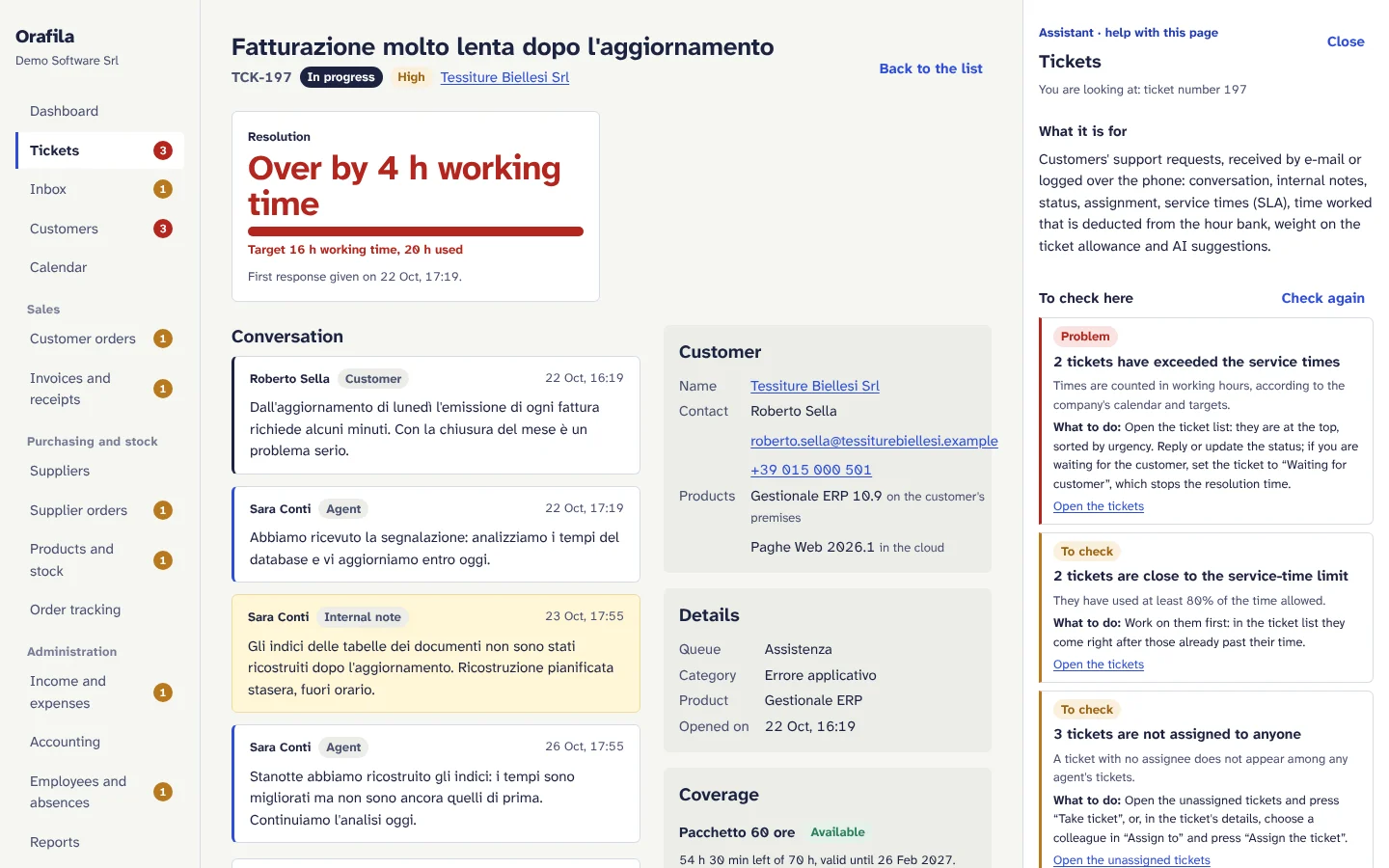
| Assistant | The Assistant page and the “Help with this page” panel on every page | Answers on how to use Orafila and on why something is not working, with the steps and links to the pages | The person. The assistant only reads: it changes nothing and never says it has done something |
Two features are already built into the application's engine but not yet available in the pages: the work report from notes (time entries proposed from written or dictated notes) and the quote from requirements (price list lines with quantities, a summary and questions for the customer).
The principles
- AI suggests, people decide. No e-mail written by the AI goes out and no ticket changes without a person's click; the only thing the AI saves by itself is the triage proposal on the ticket, which remains a suggestion until an agent applies it.
- The AI does not calculate the numbers. Service times, balances, totals, VAT, possible statuses, customer health and sender recognition are calculated by deterministic rules and reach the AI ready-made.
- Constrained choices. Categories, products, agents, modules and pages are passed to the AI as closed lists; every answer is checked again and a value outside the list is discarded. The assistant can only suggest links to known pages of the application.
- Customers' texts are data, not instructions. E-mails, questions and the results of look-ups are kept separate from the instructions, which explicitly say not to follow orders contained in those texts (protection against prompt injection). In any case the assistant reads only what the person's role can already see.
- It also works without AI. Guides and the health check are deterministic; without AI, questions search the guides, triage falls back to manual choices and every feature has its alternative.
Agents and providers
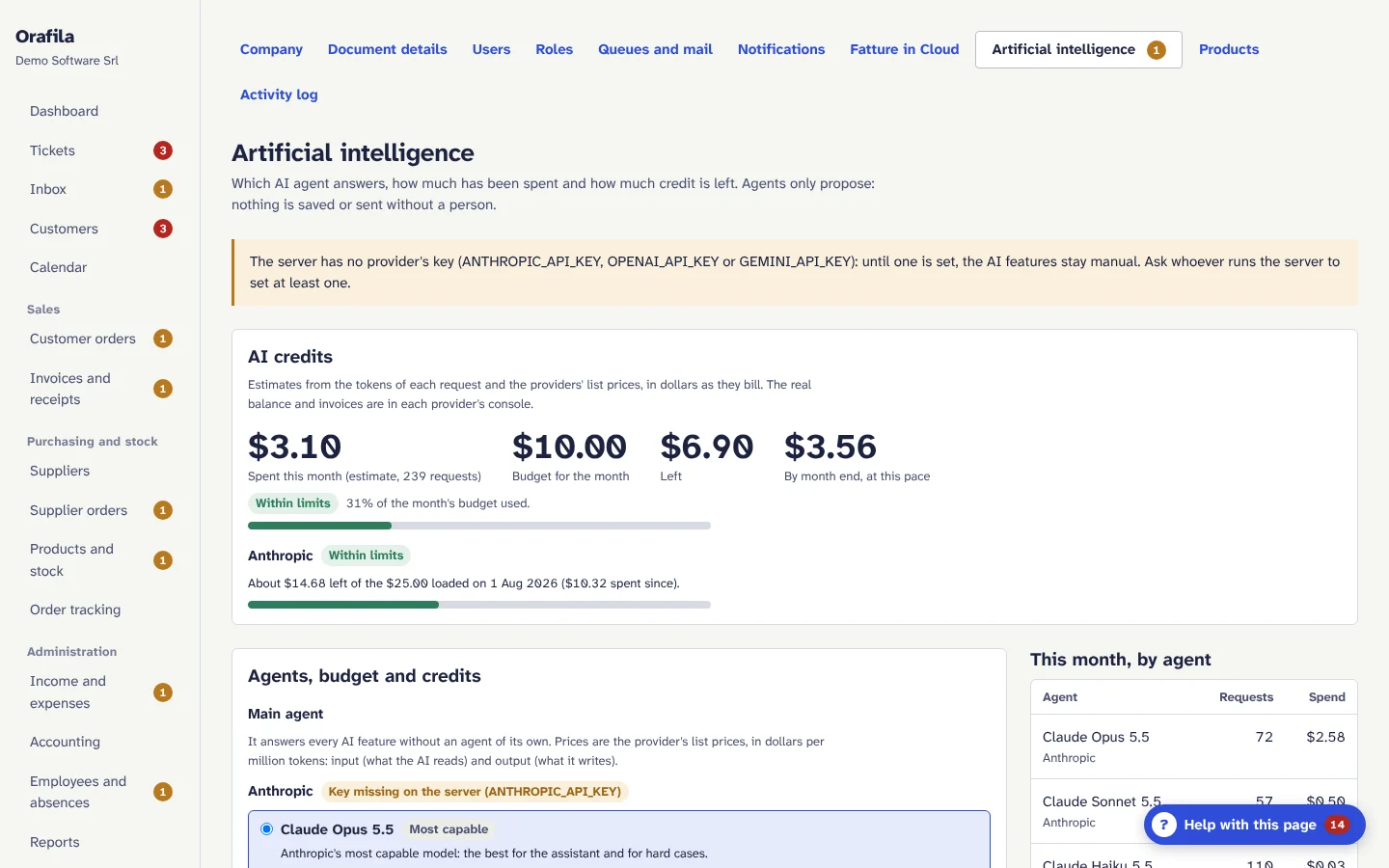
Each company chooses which AI agent answers in Settings › Artificial intelligence: a main agent and, if it wishes, a different agent for each feature (assistant, ticket triage, reply drafts, customer briefings). For example, a cheap agent for triage, which makes many simple requests, and the most capable one for the assistant.
| Provider | Most capable | Balanced | Fast and cheap |
|---|---|---|---|
| Anthropic | Claude Opus 5.5 | Claude Sonnet 5.5 | Claude Haiku 5.5 |
| OpenAI | GPT-6 Astra | GPT-6.1 Sol | GPT-6 Luna |
| Gemini 4 Argon | Gemini 3.8 Flash | Gemini 3.5 Flash-Lite |
- A provider is available when its API key is on the server (
ANTHROPIC_API_KEY,OPENAI_API_KEY,GEMINI_API_KEY). One is enough. The keys are only in the server configuration: they never pass through the pages or the database. - If the company does not choose, the server's default agent answers (Claude Opus 5.5, unless configured otherwise).
- Instructions, tools and checks are the same for every agent: quality and cost change, not behaviour.
- The page shows the list price per million tokens next to each agent.
Costs, budget and credits
- Every request is measured: feature, provider, model, input and output tokens, outcome and estimated cost from list prices, in dollars as the providers bill.
- The AI credits panel shows the month's spend, the budget, what is left, the projection to the end of the month, the spend by agent and by feature and the last six months. Administrators also see the month's spend on the dashboard.
- Optional monthly budget: at 80% the health check warns. With “Stop the AI when the month's budget is used up” the AI features go back to manual until the first of the following month (the assistant answers with the guides); without it, the AI carries on and the health check warns. The check takes place before each request, so a single long answer can go slightly over the budget.
- Credit with each provider: if you pay the providers in advance, you write the balance shown in the provider's console and the date; Orafila subtracts the estimated spend since that day. It is an estimate: it does not see use of the same key outside Orafila, nor the provider's discounts or taxes.
- How to keep costs down: the instructions common to all requests are written so that the provider can cache them, where the provider supports it (cached parts cost less); use a cheap agent for triage and the most capable one only for the assistant; the panel never calls the AI by itself, only when a person asks. A question to the assistant can require several look-ups (at most 6 rounds) and is recorded as a single request with the tokens added together.
What data is sent to the AI provider
Only when an AI feature is used, and only the data that feature needs:
| Feature | Data sent |
|---|---|
| Triage | Sender's address, subject and text of the e-mail (up to 8,000 characters); name of the recognised customer; the company's (or the customer's) categories and products; name, skills (the ticket categories set for each of them in Settings › Users) and workload (open tickets) of the agents who can work on tickets; subject and number of the same customer's open tickets |
| Reply draft | Ticket number and subject, customer name, the agent's name for the signature, the conversation (including internal notes, marked as such so that the AI does not repeat them to the customer), any knowledge base articles |
| Customer briefing | Customer name, health score and signals, facts about contracts, hour banks, ticket allowance, last contact and installed products; subjects of recent tickets (only if the person asking can see tickets) |
| Assistant | The question and the current conversation, the name of the person asking and of the company, the page the question is asked from, the Orafila guides and the results of read-only look-ups in the modules the role can see. The results may include the addresses of senders in Inbox, of recipients of e-mails that were not sent and of users (for people who manage users) |
Never sent: passwords, tokens, two-step verification secrets, mailbox passwords, Fatture in Cloud tokens. The assistant's tools do not return the e-mail addresses and phone numbers of customers' contacts, nor the billing details on orders and invoices (VAT number, address, PEC, the certified e-mail address), nor the addresses that order and invoice e-mails were sent to. The reply draft also receives the ticket's internal notes, marked as such.
Retention by the provider: depends on the terms of the chosen provider. With OpenAI, Orafila asks for conversations not to be stored (store: false). For Anthropic and Google, their API terms of use and their data processing agreement apply: check them before turning on AI (see Security and privacy).
How to limit or turn off AI
| What you want | How |
|---|---|
| No AI requests for the whole company | Settings › Company, untick “Use the AI assistant”: Orafila no longer sends any request to the AI |
| AI only for some people | Remove the “uses the AI assistant” permission from the other people's roles (Settings › Roles). Automatic triage of incoming e-mails stays active as long as AI is on for the company |
| Spending cap | Monthly budget with “Stop the AI when the month's budget is used up” |
| No AI on the whole installation | Do not set any API key on the server |
In every case the guides, the health check, the numbers in the menu and the manual procedures remain available.
Reliability
- Refusals, truncated answers or answers that do not match the expected schema are not used: the page says the suggestion is not available and the agent carries on by hand.
- Provider errors (invalid key, credit used up, network) are recorded and reported by the health check and on the dashboard.
- With Claude Opus and Sonnet, if the provider refuses a request because of its safety filters, the request is automatically repeated on an alternative model from the same provider.